BugBunny.ai • May 20, 2026 • 8 min read
GitHub's VS Code Extension Breach Was a Developer-Device Failure, Not a GitHub-Only Story
A poisoned IDE extension did not need a zero-day in GitHub's production platform. It needed developer-local execution, cached trust, and access to whatever that employee's identity could reach. That is the part every engineering organization should be reviewing today.
Confirmed vector
Poisoned VS Code extension on an employee device
Reported scope
Roughly 3,800 GitHub-internal repositories
Customer impact
No evidence reported for customer repositories or enterprise accounts
Still unknown
The exact extension, final root cause, and complete credential path
What GitHub has confirmed
On May 20, 2026, GitHub said it detected and contained a compromised employee device involving a poisoned VS Code extension. The company removed the malicious extension version, isolated the endpoint, and began incident response. Its current assessment is that the activity was limited to GitHub-internal repositories, and that the attacker's claim of roughly 3,800 repositories is directionally consistent with the investigation.
Two boundaries matter. First, GitHub has not publicly named the extension involved. Second, GitHub has not publicly attributed the incident, even though the TeamPCP group has claimed responsibility and external researchers connect the breach to a broader developer supply-chain campaign. This post treats the TeamPCP link as external reporting, not as GitHub-confirmed attribution.
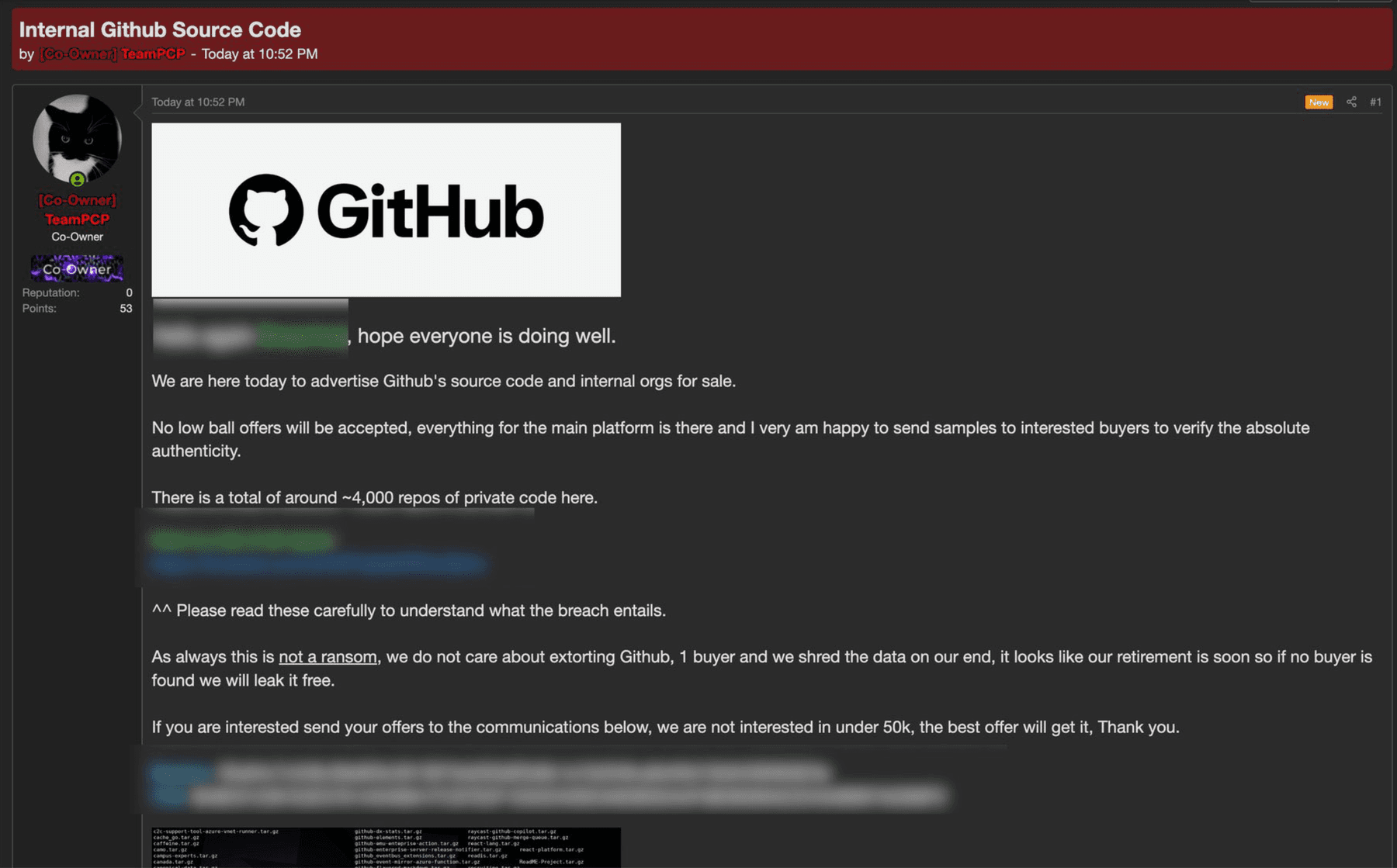
Sale claim observed
The stolen repository claim was already being advertised for sale
The redacted listing shown above advertises GitHub source code and internal organizations, claims roughly four thousand private repositories, and asks buyers to submit offers. GitHub's own status update says the attacker's claim of about 3,800 internal repositories is directionally consistent with its investigation.
Screenshot redacted to avoid publishing contact details or sensitive fields from the sale post.
Core lesson
The IDE is now part of the privileged production path
Modern developer machines are not low-trust laptops sitting outside the real system. They hold the credentials, source access, package publishing context, cloud control-plane tools, and AI coding assistants that move code into production. An extension running in that environment is not just an editor plugin. It is code running beside the organization's build and release identity.
This is exactly where BugBunny helps: by testing the developer workflow as an attack surface, not only the deployed application. The goal is to catch the auto-run, token, extension, and CI paths that turn a small tooling compromise into a dramatic repository breach.
The likely attack chain
Marketplace trust became execution trust
The useful thing about editor extensions is also the dangerous thing: they run inside the developer workflow. VS Code documents that extension code runs with the permissions of VS Code itself, including file access, network requests, external processes, and workspace setting changes.
The workstation became the control plane
A developer endpoint usually holds repository credentials, SSH material, cloud CLIs, package-manager tokens, shell history, build caches, and chat or issue-tracker sessions. Compromising the IDE is therefore not a side channel. It is a path into the identity context used to build and ship software.
Workspace configuration expanded the exposure
Workspace files can trigger code-adjacent behavior. VS Code tasks are stored under .vscode/tasks.json, and the task schema supports runOn: folderOpen. Workspace Trust and automatic-task prompts are meant to hold that line, but only if they are enabled, enforced, and treated as policy rather than preference.
Repository access followed credentials
GitHub says the activity involved GitHub-internal repositories only, and that the attacker claim of about 3,800 repositories is directionally consistent with its investigation. That points to a credentialed access path rather than a public GitHub platform break.
Why "official marketplace" is not enough
VS Code's own extension security documentation is blunt about the permission model: an extension can read and write local files, make network requests, run external processes, and modify workspace settings. Marketplace scanning, publisher trust, and install counts are useful signals, but they do not turn third-party code into low-privilege code.
The same applies to updates. A trusted extension can become malicious through publisher credential theft, compromised release automation, dependency replacement, or marketplace abuse. The nearby Nx Console compromise is the clean example: a high-install extension was backdoored briefly, and the useful defensive lesson is that minutes are enough when automatic updates put code onto developer machines before security teams can review it.
The configuration footgun
The most important local file to audit is not exotic. It is often just.vscode/tasks.json. VS Code tasks can run shell commands, and the task schema supportsrunOn: folderOpen. That is legitimate for build watchers. It is also exactly the kind of trusted-by-default workflow attackers want to inherit.
{
  "security.workspace.trust.enabled": true,
  "task.allowAutomaticTasks": "off"
}
These settings are not a complete fix. They are the minimum line between opening a folder and letting that folder decide what code runs on the machine.
Where BugBunny helps
Preventing the next poisoned-extension incident means testing the developer path directly
The defensive lesson is not just "install fewer extensions." It is that security teams need an attacker's view of the developer environment: which local config can execute, which credentials are reachable, which repositories those credentials unlock, and how fast the organization can revoke access when something is suspect.
Find dangerous workspace execution before attackers do
BugBunny audits .vscode/tasks.json, extension recommendations, devcontainer hooks, package scripts, MCP and AI-tool configs, and other workspace files that can execute when a developer opens or runs a project.
Simulate malicious-repository and poisoned-extension paths
We test the practical question this incident raises: what happens if an engineer opens a hostile repository or receives a compromised extension update? The result is a concrete list of prompts, auto-runs, secrets reached, and controls bypassed.
Map exposed credential access
BugBunny traces what local GitHub, CI, cloud, package-registry, SSH, and API credentials can actually access, then turns overbroad permissions into scoped remediation before one endpoint compromise exposes thousands of repositories.
Keep checking as the toolchain changes
Developer tooling changes weekly. BugBunny can continuously re-check IDE settings, extension versions, lifecycle hooks, release automation, and new repository configuration so a risky update does not sit unnoticed until incident response.
What to do this week
- Force Workspace Trust on for VS Code, Cursor, and any VS Code-compatible fork used by employees.
- Set task.allowAutomaticTasks to off unless a narrowly scoped exception is approved.
- Inventory installed extensions and extension versions across the fleet, not only in developer self-reports.
- Add a minimum-age hold for new extension and package versions before they can auto-update onto workstations.
- Treat .vscode/tasks.json with runOn: folderOpen as a security finding in internal and third-party repositories.
- Correlate extension installs, endpoint events, and GitHub token usage so repository access after a new extension install is visible.
- Rotate developer tokens based on exposure windows and measure time-to-revoke in minutes, not business days.
What BugBunny would test
This incident maps directly to the kinds of surfaces most automated scanners still underweight: IDE configuration, extension manifests, package-manager lifecycle hooks, CI/OIDC release paths, secret exposure in developer workflows, and the path from one compromised workstation to many repositories.
A useful assessment should not stop at "do we have SCA?" It should answer whether a malicious repository, extension update, package hook, or AI-tool configuration can execute before trust is established, and whether the tokens reachable from that execution context can be used to publish code, read private repositories, or move into CI.
BugBunny is built for that gap. We combine offensive testing with targeted control validation: can the poisoned workspace run, can it reach secrets, can it move from a workstation into GitHub or CI, and can the team detect and revoke the path before credential exposure becomes a public incident.
Use BugBunny before this becomes your postmortem
A developer-tooling compromise only needs one overtrusted machine to become an organization-wide incident. BugBunny helps teams turn that risk into concrete work: remove silent auto-execution, harden extension and package update paths, reduce exposed credential access, and prove revocation procedures work under realistic attack conditions.
Sources
Incident details are still developing. These are the sources used for this post.